Posted on

How Often Should You Update Old Blog Posts?

There is a quiet anxiety that sets in when you look at your content library and realize how much of it is aging. Every post you have ever published is a small promise to your readers that what they are reading is true, useful, and current. But time does not stand still, and neither does the web. The question is not whether you should revisit old work but how often, and with what urgency.

The honest answer depends on what the post is doing for you right now. A piece that sits in the long tail of your analytics, drawing a few visits a month and converting no one, does not need your attention this week. But a post that once drove significant organic traffic and has begun to slope downward deserves your focus immediately. Traffic trends are the most honest calendar you have. When a high-performing post loses ten percent of its monthly visitors for two consecutive months, that is your signal. Not next quarter. Now.

For posts that rank on the first page of search results, the maintenance window shrinks even further. The top positions are not earned once and held forever. They are rented by the month, and the rent is relevance. A competitor publishing a more current, more comprehensive answer to the same query can displace you in a matter of weeks. If you depend on organic search for leads or revenue, your highest-ranking posts should be reviewed at least every ninety days. This does not mean rewriting them from scratch every quarter. It means checking whether the facts still hold, whether the links still resolve, whether the screenshots still match the current interface of the tool you are describing, and whether any new developments in your industry have made your advice incomplete or worse, misleading.

Evergreen content is often misunderstood as content that never needs updating. The term refers to topics that remain relevant over long periods, not to articles that maintain themselves. A guide on how to write a business plan is evergreen in subject but not in execution. The examples you use, the templates you link to, and the economic context you assume will all drift. Evergreen posts should be refreshed at least twice a year. Think of it as changing the oil in a reliable car. The engine is sound, but neglect will still seize it.

Posts tied to fast-moving industries or technology require a different rhythm entirely. If you write about software, digital marketing tactics, health guidelines, or financial regulations, annual updates are the minimum and semi-annual updates are closer to the standard. In these spaces, what was accurate in January can be obsolete by June. Your readers know this. They check the date. A post about social media strategy from 2024 carries a weight of suspicion in 2026 that no amount of good writing can overcome. The date stamp is a trust signal, and letting it grow stale is a choice to let trust erode.

There is also a category of content that should never be updated, and knowing which posts these are is as important as knowing which to refresh. A personal essay rooted in a specific moment in time loses its integrity if you rewrite it to sound current. A historical analysis should be preserved as a snapshot of understanding, perhaps with a preface noting what has changed since, but not rewritten to pretend you knew then what you know now. News commentary and reaction pieces fall into this category too. They are artifacts, not assets, and their value is archival. Trying to optimize them for current search traffic is usually a mistake that wastes time and dilutes your voice.

The practical rhythm that works for most publishers looks something like this. Once a month, scan your analytics for posts that have dropped in traffic or ranking position. Once a quarter, conduct a deeper audit of your top twenty percent of posts by traffic and conversion value. Once every six months, review your evergreen library for factual drift, broken links, and opportunities to expand or sharpen the argument. Once a year, assess whether any posts should be consolidated, redirected, or retired entirely. This layered approach keeps you from drowning in maintenance while ensuring nothing critical slips through the cracks.

Updating is not just about correction. It is about expansion. The best revisions add depth. You might return to a post you wrote two years ago and realize you have learned enough since to double its length and usefulness. You might have new case studies, new data, or a clearer way to explain the concept. The web rewards comprehensiveness, and your older posts are often the best candidates for growth because they already have history and authority behind them. A thin post that ranks on the strength of its domain can become a definitive resource with patient expansion.

There is a psychological benefit to this practice too. Writers often feel pressure to constantly generate new ideas, as if publishing volume is the only measure of productivity. Revisiting old work breaks this cycle. It reminds you that good ideas are durable and that your best thinking deserves maintenance, not abandonment. It also trains you to write with more foresight. When you know you will be living with a post for years, you choose topics more carefully, structure them more cleanly, and avoid references that will date too quickly.

The cadence you settle on should reflect your resources and your goals. A solo blogger with a day job cannot maintain the same schedule as a content team with dedicated editors. But the principle remains the same. Your content library is not a museum. It is a garden, and gardens need regular tending. Some plants need daily water. Others thrive with seasonal pruning. The skill is learning to read the signs and respond before the wilting becomes visible to everyone else.

Posted on

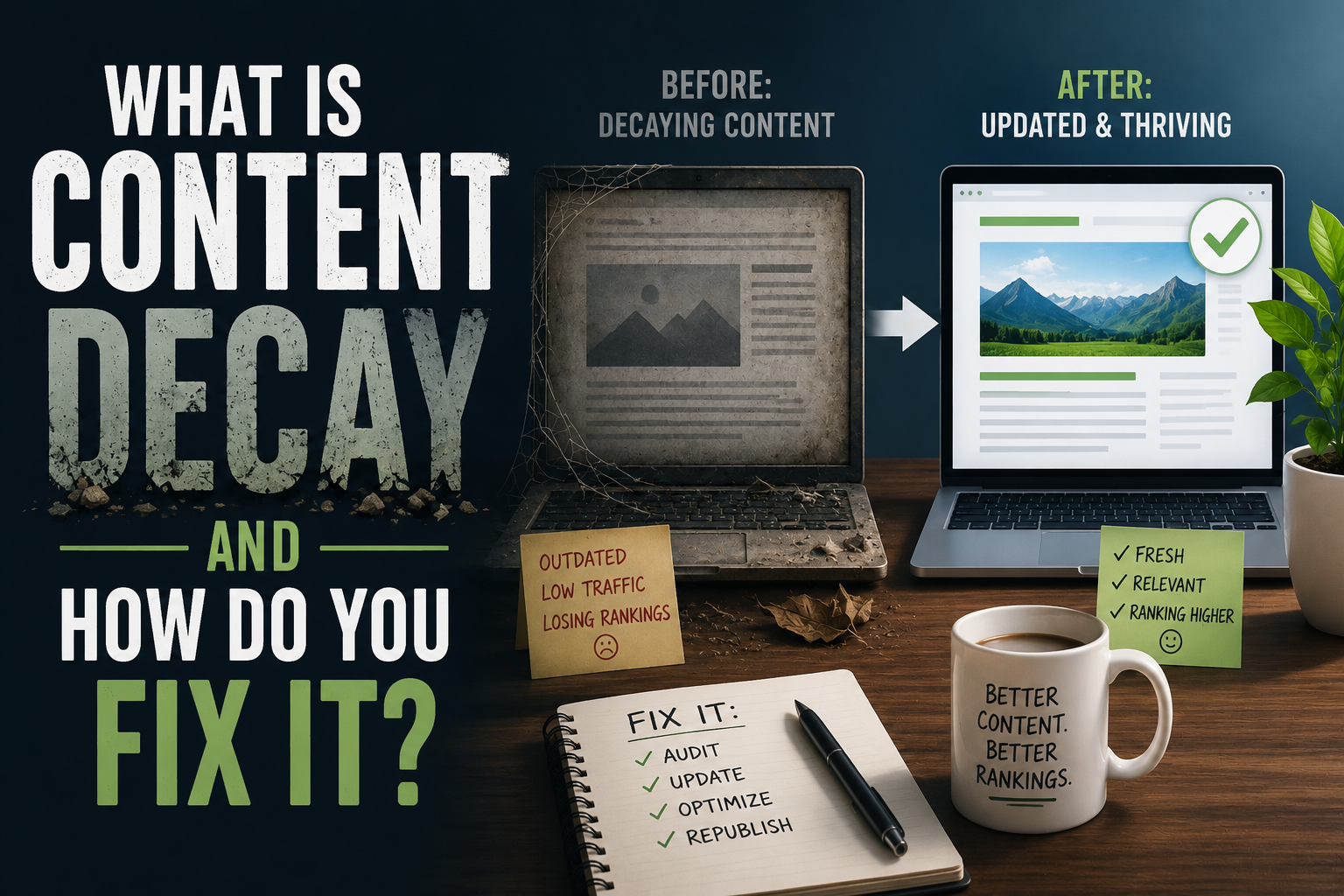
What Is Content Decay and How Do You Fix It?

Every piece of content you publish is a living thing with a natural lifespan. When it first goes live, it draws attention, climbs search rankings, and generates traffic. But over time, almost every article, guide, or blog post begins to fade. This gradual decline in performance is what marketers call content decay, and it is one of the most overlooked threats to a website’s long-term success.

Content decay does not mean your writing has become bad. It means the world around it has changed. Search engines update their algorithms. New competitors enter the space with fresher perspectives. The facts you cited become outdated. Links you included go dead. Even the language people use to search for your topic shifts. Your article is still technically there, still indexed, but it has lost the signals that once made it visible and valuable. The traffic graph does not crash overnight. Instead it slopes downward gently, week by week, until you realize a post that once brought thousands of visitors now brings only a handful.

The real danger of content decay is its invisibility. A sudden traffic drop triggers alarms. A slow leak often goes unnoticed. You might keep producing new content while your existing library quietly rots. This creates a paradox where you work harder and harder to grow traffic while your foundation crumbles beneath you. The cost is not just lost visitors. It is lost trust. A reader who lands on a post with broken links, outdated statistics, or advice that no longer reflects current best practices will leave with a poorer impression of your brand. Decay turns assets into liabilities.

So how do you recognize it before the damage becomes severe? The most reliable signal is a sustained downward trend in organic traffic to a specific page over a period of several months. You might also notice that a page still ranks but for less valuable keywords, or that its click-through rate has dropped even though its average position looks stable. Sometimes the decay is relative rather than absolute. Your traffic might hold steady while competitors surge past you, meaning you are losing market share even if the raw numbers look acceptable. Social shares and backlinks might slow to a trickle. Comments and engagement might dry up. These are all symptoms of the same underlying condition: your content has become less relevant to the current moment than it once was.

Fixing decay requires a different mindset than creating something new. When you write a fresh article, you are building from a blank page. When you revive decaying content, you are performing surgery. You must diagnose precisely what has changed and why the page lost its edge. Start by examining the search results for your target keywords today. Look at what is ranking above you. Is the content more comprehensive? Does it include newer data? Is the format more useful, perhaps with video, interactive tools, or a cleaner structure? Is the page faster and easier to read on mobile devices? Your competitors are not just writing better sentences. They are solving the searcher’s problem more effectively.

Once you understand what has changed, the revision process begins. Update any statistics, examples, or references that have aged. Remove broken links and replace them with current, authoritative sources. Expand sections that feel thin compared to what now ranks well. Consider whether the search intent has shifted. A query that once called for a quick definition might now be best answered with a detailed tutorial. Rewrite your introduction and conclusion to reflect the current conversation around the topic. If the original post was written years ago, the tone might need adjusting to match how your audience communicates today.

Technical maintenance matters just as much as the words on the page. Search engines favor pages that load quickly and display correctly across devices. An older post might be weighed down by oversized images, outdated code, or formatting that breaks on modern browsers. Refreshing the publish date can signal freshness to both readers and algorithms, but only if the update is substantive. Simply changing the date without improving the content is a short-term trick that ultimately damages credibility.

Internal linking is another powerful tool for combating decay. As you publish new content, link back to your older posts where relevant. This distributes authority and helps search engines rediscover pages that might have slipped from their crawl priorities. Conversely, review your older posts and add links to newer resources you have created. This transforms a static article into a hub that connects to the broader ecosystem of your site.

Sometimes the fix is not a revision but a consolidation. If you have multiple posts targeting similar keywords, they might be cannibalizing each other. Merging them into one definitive resource can create a stronger page than the sum of its parts. Other times, the honest answer is that a topic is no longer worth maintaining. The market has moved on, or your business has pivoted. In those cases, redirecting the old URL to a more relevant current page preserves whatever authority it had while steering visitors toward something useful.

The most effective approach to content decay is prevention through rhythm. Build a practice of regularly auditing your content library. Set a schedule to review your highest-traffic posts every quarter and your mid-tier posts every six months. Track performance in a simple dashboard so you can spot downward trends before they become steep drops. When you plan new content, design it with longevity in mind. Write about foundational topics that will remain relevant. Use evergreen language rather than references that will date quickly. Build modular content that can be easily updated without a full rewrite.

Content decay is not a failure. It is a natural process, like erosion or entropy. The web is not a library where books sit unchanged on shelves. It is a garden where every plant needs tending. The sites that dominate search results year after year are not necessarily the ones that publish the most. They are the ones that relentlessly maintain what they have already built. They treat their existing content as a portfolio of assets that requires active management, not a collection of finished projects to be abandoned.

Your best posts are your hardest workers. They have already proven they can attract an audience. Letting them decay is like leaving a productive employee to struggle without support. With attention, diagnosis, and careful revision, you can restore their performance and often push them to new heights. The fix is rarely as glamorous as launching something new, but it is usually more efficient. One thoroughly updated post can outperform five hastily written new ones. In a landscape where attention is scarce and competition is fierce, the discipline of maintenance is what separates durable authority from fleeting noise.

Posted on

On-Page SEO Checklist for Every New Post

Once you know what topic and keyword a new post is targeting, following the keyword research process covered earlier in this series, there’s a separate, more mechanical layer of work that determines how well that post is actually set up to perform once it’s live. This post covers the on-page checks worth running through for every new piece before hitting publish, framed as a sequence to work through rather than a checkbox list.

Confirm the Title Matches Search Intent

Start with the page title, since it’s the single most important on-page element for both search engines and readers deciding whether to click. Read the title as if you were the searcher who typed your target phrase, and ask honestly whether it clearly promises the answer to that specific question. A title that’s clever or vague at the expense of clarity tends to underperform a title that’s plain but immediately tells a searcher exactly what they’ll get, especially for more direct, practical search queries where readers are scanning results quickly rather than browsing leisurely.

Write a Meta Description That Earns the Click

The meta description doesn’t directly affect rankings the way it once did, but it still strongly influences whether someone clicks your result over a competitor’s when both appear in search results for the same query. A good meta description restates the core value of the post in a sentence or two, written for a human deciding between several similar-looking results, rather than stuffed with keywords aimed at a search engine that mostly ignores this field for ranking purposes anyway.

Use Headers That Reflect Real Subtopics

Headers should break the post into the actual logical subtopics a reader is moving through, not exist purely to insert keyword variations at regular intervals. A reader skimming your headers alone should be able to get a rough sense of the post’s structure and decide which section to read closely. This also connects directly to how search engines parse a page’s structure, since clear, logically ordered headers make it easier for a page to be understood and appropriately matched to related, adjacent search queries beyond just the primary target phrase.

Address the Actual Question Early

Whatever the primary question a reader searched to find this post, make sure the post actually addresses it clearly within the first few paragraphs, rather than building up to it slowly through extended preamble. This matters for readers, who decide within seconds whether a page is going to answer what they came for, and it matters for search engines, which increasingly evaluate whether a page’s early content is genuinely relevant to the query it’s ranking for.

Check Internal Links Before Publishing, Not After

Every new post should link up to its relevant pillar page and across to at least one or two genuinely related cluster posts, following the standards from the internal linking guide earlier in this series, and this should happen at the time of publishing rather than being deferred to some future audit. A new post published with zero internal links is, by definition, an orphan from the moment it goes live, and it’s far easier to add these links while you’re already deep in the post’s context than to come back to it later.

Confirm Images Have Descriptive Alt Text

Any images in the post should have alt text that accurately describes what the image shows, both for accessibility and because search engines use alt text to understand image content for image search results, which can be a meaningful secondary traffic source for visually relevant topics. Generic or missing alt text is a small thing individually but an easy, low-effort win to get right at publish time rather than retrofitting across dozens of old posts later.

Check That URL Slugs Are Clean and Stable

The URL slug should be short, readable, and reasonably reflective of the post’s topic, since a clean slug is both more shareable and slightly more useful as a relevance signal than an auto-generated string of numbers or an overly long sentence-length slug. More importantly, once a post is published and has any traffic or backlinks at all, its URL should be treated as effectively permanent, since changing it later requires the redirect care covered in the safe reorganization post earlier in this series. Getting the slug right before publishing avoids that problem entirely.

Verify Mobile Readability

Before publishing, actually look at the post on a phone screen, not just a desktop editor. Paragraph length that looks reasonable on a wide desktop screen can look like an intimidating wall of text on mobile, where the majority of casual blog traffic now arrives. Breaking up long paragraphs, keeping sentences reasonably short, and making sure any tables or embedded content actually render sensibly on a narrow screen all affect how long a mobile reader is willing to stay on the page.

Double-Check for Accidental Duplication

Before publishing something new, do a quick check of your own site for existing coverage of the same specific question, following the prevention habit described in the duplication post earlier in this series. This takes a couple of minutes and prevents exactly the kind of self-competition that’s far more time-consuming to untangle after both posts have accumulated their own traffic and backlinks.

Confirm the Post Fits Its Intended Cluster

Finally, before publishing, confirm the post genuinely fits into the cluster and pillar structure you intended for it, rather than drifting into a tangent partway through writing that no longer matches its planned place in your site’s structure. If a post has drifted, it’s worth deciding at publish time whether to adjust the post back toward its intended topic, or to consciously treat it as belonging to a different cluster than originally planned, rather than publishing it into a structural slot it no longer actually fits.

Treat This as a Pre-Publish Habit, Not an Afterthought

Every item above is far faster to address before a post goes live than after, since fixing internal linking, titles, or structural fit on an already-published, already-indexed post carries some of the same friction covered throughout this series regarding safe reorganization. Building this checklist into your actual publishing workflow, rather than treating it as a periodic audit task, is what prevents most of the structural problems this series has covered from accumulating in the first place.

The next post in this series looks at a concept that’s been referenced throughout without being fully defined yet: content decay, what causes it, and how to recognize and reverse it once it sets in.

Posted on

Keyword Research for Bloggers Who Don’t Have a Team

Keyword research has a reputation for requiring expensive tools, spreadsheets full of search volume data, and hours of comparison work that a solo blogger juggling writing, editing, and everything else simply doesn’t have time for. That reputation is only partly deserved. A useful, honest keyword research process doesn’t require any paid tool at all for most solo bloggers, and the version that does use paid tools still takes far less time than the version most guides describe.This post covers a practical approach scaled to the reality of running a blog alone, rather than the enterprise-content-team version most keyword research advice is secretly written for.

What Keyword Research Is Actually For

Before getting into method, it’s worth being clear about the goal. Keyword research isn’t primarily about finding a magic phrase to stuff into a post. It’s about understanding what real people are actually typing into search engines when they have the problem or question your post is meant to answer, so you can write toward the way people actually ask, rather than the way you’d naturally phrase it as someone who already knows the topic well.

This distinction matters more than it sounds. Writers who know a subject deeply often default to more precise, technical phrasing than the average searcher uses, simply because that’s how they think about the topic internally. Keyword research is largely a corrective for that gap.

Starting With Google Itself, Free

The most underrated keyword research tool is Google’s own search results page, and it costs nothing. Typing a rough topic into the search bar and looking at the autocomplete suggestions that appear as you type surfaces real, common phrasings people actually search, since those suggestions are generated directly from aggregate search behavior.

Scrolling to the bottom of any search results page and looking at the “people also ask” and “related searches” sections extends this further, often surfacing adjacent questions and phrasings you wouldn’t have thought to search yourself. Doing this for even a handful of core topics your blog covers generates a genuinely useful list of real search phrases without touching a single paid tool.

Using Search Console Data From Your Own Site

If your blog already has any traffic at all, Google Search Console contains some of the most valuable keyword data available to you, and it’s free. The Performance report shows the actual queries people are searching when your existing posts appear in search results, including queries where you’re getting impressions but few clicks, which often points to a title or meta description that isn’t matching what searchers expect from the phrasing they used.

This data is specific to your own site’s actual performance, which makes it more directly useful than generic keyword volume data from a third-party tool, since it reflects real searches that are already finding your content, rather than theoretical search volume for a term you haven’t targeted yet.

When a Paid Tool Actually Helps

Free methods cover a lot of ground, but they don’t tell you approximate search volume or competitive difficulty for a term, which matters when you’re deciding between several possible angles for a new post and want some sense of which is worth the effort. If you do want this data, a single month of a mid-tier keyword tool, used in a concentrated batch to research an upcoming cluster of posts rather than kept as a permanent monthly subscription, is usually enough. Solo bloggers rarely need year-round access to a keyword tool if the research is done in planned batches rather than continuously.

Researching a Whole Cluster at Once, Not One Post at a Time

Rather than researching keywords post by post as you write, it’s more efficient to research an entire planned cluster in one sitting, following the cluster-building process from earlier in this series. Start from the pillar topic, list every reasonable subtopic and question using the free methods above, then group those into the individual posts that will make up the cluster. This produces a keyword-informed content plan for the whole cluster at once, rather than a series of disconnected, one-off research sessions.

Matching Search Intent, Not Just Search Terms

A keyword by itself doesn’t tell you what kind of content should rank for it, and writing a post that technically contains the right words but answers the wrong kind of question rarely performs well. Before writing, actually look at what’s currently ranking for a target phrase. If the current top results are all short, direct answers, and you’re planning a long, exhaustive guide, that mismatch is worth noticing before you invest the time, since it may mean the searcher’s actual intent is simpler than the content you’re planning to write.

This connects directly to the reader-journey framework covered earlier in this series: a keyword search reveals not just a topic but often a stage, and matching your content’s depth and framing to that stage matters as much as matching the words themselves.

Avoiding the Keyword-Stuffing Trap

Once you have a target phrase, resist the instinct to repeat it unnaturally throughout a post in an attempt to reinforce relevance. Modern search engines are far better at understanding topical relevance through natural language and surrounding context than they were years ago, and forced, repetitive keyword usage tends to make writing worse without providing the ranking benefit it once might have. Write naturally toward the topic and the intent behind the search, using variations and related phrasing as they’d naturally occur, rather than mechanically repeating one exact phrase.

Keeping Research Sustainable Over Time

The realistic constraint for a solo blogger isn’t whether keyword research is valuable, it’s whether it’s sustainable to keep doing consistently without it becoming a chore that gets skipped under time pressure. Batching research by cluster rather than by individual post, relying primarily on the free methods above, and reserving paid tools for occasional, focused sessions rather than an ongoing subscription all help keep this sustainable long-term, which matters more for a solo operation than having access to the most sophisticated possible research process.

The next post in this series moves from finding the right topics to executing them well on the page, covering the on-page SEO checklist worth running through for every new post you publish.

Posted on

Signs Your Blog Has a Content Organization Problem

This series has moved through every piece of a blog’s content structure: clusters, pillar pages, internal linking, duplication, cluster sizing, site architecture, safe reorganization, taxonomy, prioritization, and reader journey mapping. This closing post steps back and asks a simpler question: how do you know, without running a full audit first, whether your blog actually has an organization problem worth addressing at all?

Not every blog needs this work. A newer blog with thirty well-considered posts might already be in reasonable shape. A five-year-old blog with four hundred posts almost certainly isn’t, whether or not the person running it has noticed yet. This post covers the signs worth watching for, so you can gauge roughly how urgent this work is for your specific site before committing real time to it.

You Can’t Remember Everything You’ve Written

A simple but telling sign is genuinely not being sure whether you’ve already covered a specific topic. If a new post idea makes you pause and wonder “have I already written about this,” and you have to go check rather than knowing immediately, that’s a sign your blog has grown past the point where its structure lives entirely in your memory. This is exactly the condition that leads to the duplication problem covered earlier in this series, since posts written without a clear memory of existing coverage are the most common source of accidental overlap.

Your Best Content Isn’t Your Most-Visited Content

Compare which posts you consider your strongest, most comprehensive work against which posts actually receive the most traffic and links, using Search Console data. A meaningful mismatch, where your best work is buried and mediocre older posts get disproportionate traffic, often points to a linking and discoverability problem rather than a content quality problem. This is frequently a symptom of orphaned posts or a pillar structure that isn’t properly directing readers and search engines toward your strongest pages.

New Posts Don’t Have an Obvious Home

When you sit down to plan a new post, notice whether it’s immediately obvious which existing cluster it belongs to and which posts it should link to, or whether you’re essentially starting from scratch each time with no clear sense of how the new piece connects to anything you’ve already published. The latter is a strong sign your site architecture isn’t functioning as an actual structure, even if individual posts are perfectly fine on their own.

Your Navigation Doesn’t Reflect What You Actually Cover

Look at your homepage and main menu as if you were a first-time visitor, and ask honestly whether they’d give an accurate picture of everything your blog covers in depth. If your navigation is dominated by a chronological post feed with no clear topic overview, or if it highlights topics you’ve since moved away from while omitting ones you’ve built real depth in, that’s a structural gap between what your blog actually is and what it presents itself as, a mismatch covered in more detail in the architecture post earlier in this series.

Your Categories or Tags Have Become Unmanageable

A tag cloud with hundreds of entries, most used only once or twice, or a category list that’s grown well past what any reader could reasonably scan and understand, is a fairly direct sign that your taxonomy has drifted from your actual content structure over time, usually because new topics were tagged rather than properly categorized as they came up.

Rankings for Related Posts Trade Places Unpredictably

If you track rankings at all, watch for a pattern where two or more of your posts on a similar topic seem to swap positions in search results from month to month, with neither one settling into a stable, clear position. This volatility is often a sign search engines themselves are uncertain which of your pages should be the authoritative answer for a given query, which is one of the more reliable technical fingerprints of the duplication problem covered earlier in this series.

Old Posts Are Quietly Losing Traffic With No Clear Cause

A gradual, unexplained decline in traffic to older posts, without any obvious external cause like a competitor outranking you or the topic simply becoming less relevant, is a sign of the kind of content decay this series has referenced throughout and that the next part of this content plan covers directly. Left unaddressed, decayed posts tend to drag down the performance of the whole cluster they belong to, since a weak pillar or a weak central post affects everything linked around it.

You Feel Overwhelmed Just Thinking About Auditing Your Own Site

Perhaps the most honest signal of all: if the idea of sitting down and mapping out your entire blog’s structure feels daunting enough that you’ve been avoiding it, that avoidance itself is informative. It usually means there’s more scattered, unorganized content than feels manageable to review by hand, which is precisely the situation where the manual audit process covered throughout this series starts to become genuinely tedious, and where automating the repetitive parts of that process, the reading, grouping, and flagging, while still making the final judgment calls yourself, starts to make a real difference in whether the work actually gets done at all.

What to Do If Several of These Sound Familiar

If two or three of these signs feel true for your blog, it’s worth starting with the content audit from earlier in this series, treating it as a diagnostic rather than committing to fixing everything at once. If most or all of them sound familiar, the full checklist is the more thorough starting point, worked through using the prioritization framework covered later in this series so the highest-impact fixes happen first.

None of this needs to happen in a single weekend, and treating it as an ongoing habit rather than a one-time emergency project, as this series has emphasized throughout, is what actually keeps a blog organized once it’s finally in reasonable shape. The point of recognizing these signs isn’t to feel behind. It’s to know honestly where your blog stands, so you can decide deliberately how much of this work is worth doing, and in what order, rather than either ignoring the problem indefinitely or feeling like you need to fix everything overnight.

Posted on

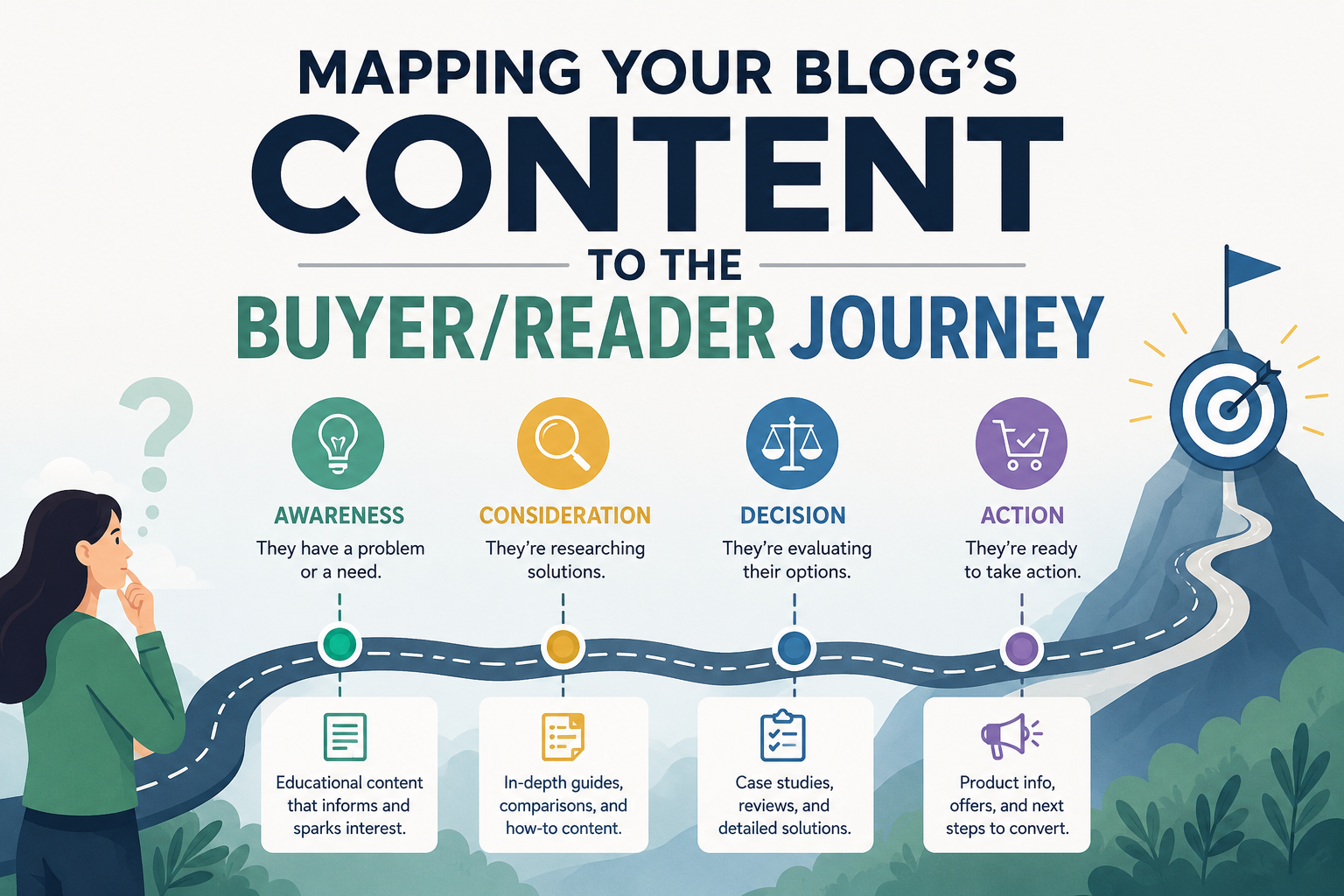
Mapping Your Blog’s Content to the Buyer/Reader Journey

Most of this series has focused on structural questions: how posts relate to each other, whether they’re linked properly, whether a cluster is the right size. This post looks at a different but related question: whether the content itself matches what a reader actually needs at the specific point they’re at in their relationship with your topic. A perfectly structured cluster can still underperform if every post in it is written for the same kind of reader, while ignoring several other kinds of readers who are searching for the same broad topic with very different needs.

The Three Broad Stages a Reader Moves Through

For almost any topic, readers tend to fall into three broad stages, even outside of an explicitly commercial context. The first stage is awareness, where a reader is just starting to explore a topic and often doesn’t yet have the vocabulary or framework to ask a more specific question. Someone new to home coffee brewing searching “why does my coffee taste bad” is in this stage. The second stage is consideration, where a reader understands the topic reasonably well and is now comparing specific approaches or options against each other. The same reader, a few weeks later, searching “pour-over versus French press” has moved into this stage. The third stage is decision or application, where a reader has settled on an approach and needs specific, actionable guidance to execute it well, such as searching “best grind size for a specific pour-over dripper.”

Even for a blog that isn’t selling anything directly, this framework is useful, because it maps cleanly onto search intent. A cluster that only has posts written for the decision stage, full of specific product or method recommendations, will struggle to capture readers who are still in the awareness stage and haven’t yet formed the more specific question your existing content answers.

Auditing a Cluster Against the JourneyTake any existing cluster and, post by post, identify which stage each piece of content is really written for. It’s common to find clusters heavily skewed toward one stage, usually consideration or decision, since those tend to be the more concrete, easier-to-write topics, while awareness-stage content requires explaining fundamentals that feel almost too basic to the person writing them, despite being exactly what a genuinely new reader needs.A cluster that’s missing awareness-stage content is invisible to readers who haven’t yet learned enough to ask a more specific question, even if the cluster is comprehensive for anyone who’s already past that point. This is a common and fixable gap, and often one of the highest-value additions to an existing cluster, since awareness-stage queries are frequently higher volume than the more specific queries a cluster’s existing content already covers.

Why This Differs From the Distinct-Question Test

The cluster sizing post earlier in this series covered checking whether a cluster has posts for every distinct reader question. This is a related but different lens: even a cluster with a full set of distinct-question posts can be skewed if every one of those questions happens to be asked by a reader at the same stage. A cluster can have ten genuinely distinct posts and still fail a new reader if none of them explain the topic from first principles, because the writer, being deep in the topic themselves, unconsciously wrote every post assuming a baseline of knowledge only a consideration or decision-stage reader would already have.

Both checks are worth running on the same cluster, since they catch different kinds of gaps. The distinct-question test catches missing subtopics. The journey-stage test catches missing depth levels within topics you’ve already covered.

Linking Across Stages Deliberately

Once a cluster has content spanning multiple stages, the internal linking between them matters more than usual. An awareness-stage post should naturally link forward to the more specific consideration-stage content a reader is likely to want next, once they’ve absorbed the basics. A decision-stage post can link back to the more foundational content for any reader who arrived at a specific, advanced query without the background it assumes, giving them a path to fill that gap without leaving your site.

This kind of stage-aware linking, layered on top of the general internal linking principles from earlier in this series, effectively creates a guided path through a topic, rather than a flat set of equally-weighted posts a reader has to sort through on their own.

Applying This to Non-Commercial Blogs

It’s worth being clear this framework isn’t only useful for blogs selling something. A hobby blog, a personal interest site, or a blog that monetizes purely through ads still benefits from thinking in these terms, because the underlying pattern, readers arriving at different levels of existing knowledge and needing different things from the same broad topic, exists regardless of whether a purchase decision is involved anywhere in the picture. Substituting “decision” for something like “ready to try this myself” works just as well as a mental model for a strictly informational blog.

A Practical Starting Exercise

For any cluster you consider important, list out the actual search queries or reader questions you already know are relevant to the topic, then sort them by which stage they represent. If one stage has noticeably fewer entries than the others, that’s your next content priority for the cluster, likely more valuable than adding another post at a stage that’s already well covered. This exercise is quick to do once per cluster and tends to surface gaps that a purely structural audit, focused on links and duplication rather than reader intent, would miss entirely.

The next post in this series pulls this thread together with everything covered so far, describing the general warning signs that indicate a blog has a content organization problem worth addressing, whether that’s structural, stage-related, or both.

Posted on

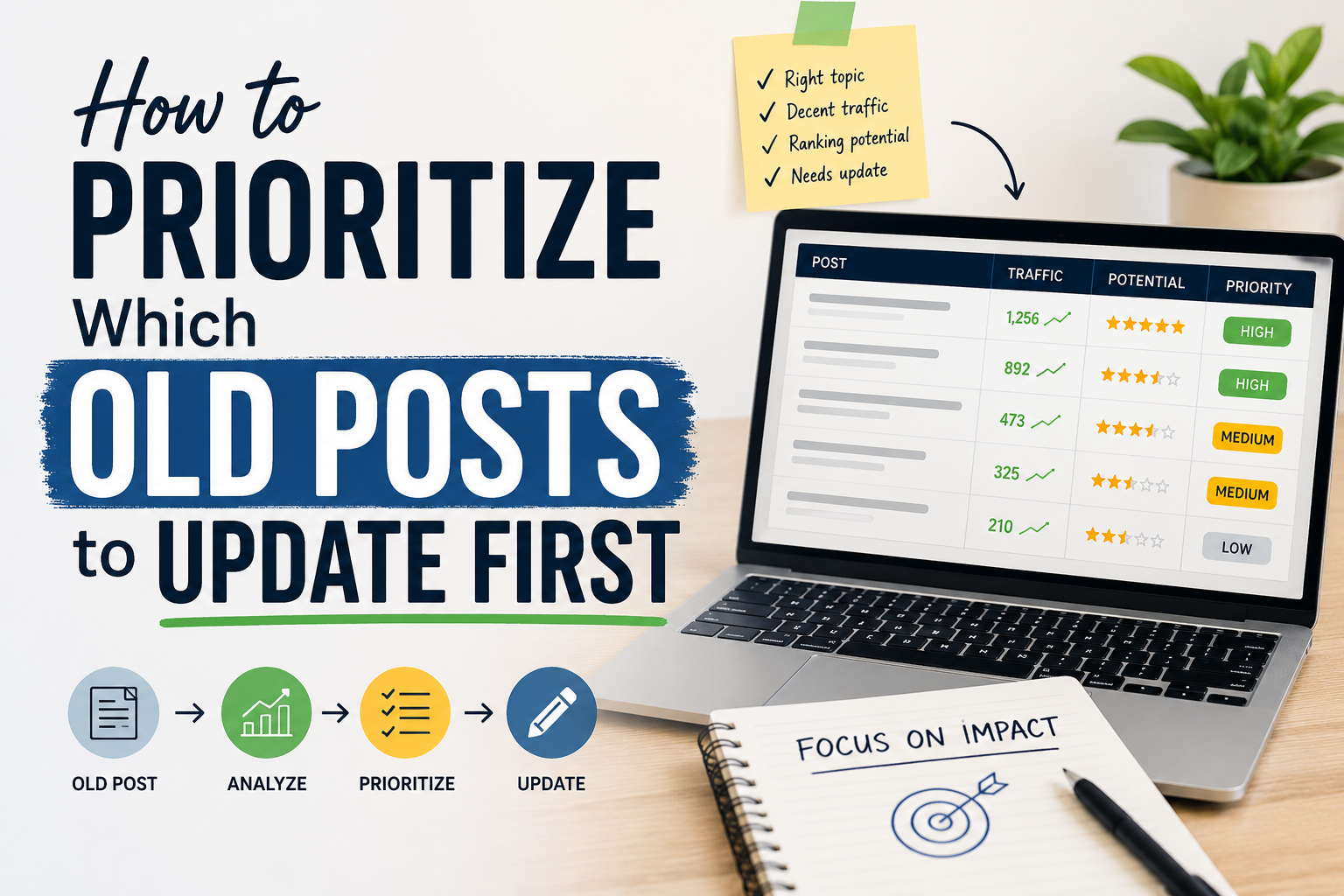
How to Prioritize Which Old Posts to Update First

Once a content audit or the full checklist covered earlier in this series turns up a long list of posts that need attention, a new problem appears: there’s rarely enough time to fix everything at once. A blog with a hundred or more posts might surface a dozen orphans, several duplication pairs, and a handful of decaying posts in a single audit pass, and tackling all of it immediately usually isn’t realistic for a solo blogger with limited hours.

This post covers how to sequence that work so the highest-impact fixes happen first, rather than working through the list in whatever order it happens to be sorted.

Traffic and Ranking Potential First

The single most useful sorting factor is how much traffic or ranking potential a post already has, or is close to having. A post sitting at position four for a decent-volume keyword is worth fixing before a post buried at position thirty for a keyword almost nobody searches, even if the second post has more glaring structural problems. The goal of prioritization is impact, and impact is concentrated in posts that are close to performing well, not spread evenly across every flagged issue.

Pull average position and click data from Search Console for every flagged post, and sort your fix list by that data before anything else. Posts in positions four through fifteen for reasonable-volume terms are usually your highest-leverage targets, since they’re close enough to page-one visibility that a fix, whether that’s better internal linking, a duplication merge, or a content refresh, has a real chance of pushing them into meaningfully more traffic.

Central Cluster Posts Before Peripheral Ones

Beyond individual post performance, consider where a post sits within its cluster. A problem on a pillar page, or on a post that many other posts link into, has ripple effects across the whole cluster, since fixing it improves the experience and link equity for everything connected to it. A problem on a peripheral, rarely-linked supporting post affects mostly that one page.

When two issues seem roughly comparable in severity, default to fixing the one closer to the center of its cluster first, following the hierarchy described in the site architecture post earlier in this series. A pillar page with weak or missing links out to its cluster is a higher priority than one supporting post within that same cluster having a similar linking issue.

Fix Type Matters as Much as Fix Location

Not all fixes take the same effort, and it’s worth weighing effort against expected impact rather than working strictly by severity alone. Adding a missing internal link or two takes minutes and carries essentially no risk, which makes it worth doing liberally across many posts even for relatively minor cases. Merging two overlapping posts and setting up a redirect takes longer and carries the reorganization risks covered in the safe-reorganization post earlier in this series, which makes it worth reserving for cases where the overlap is clear and the expected benefit is meaningful. A full content rewrite of a decayed post is the most time-intensive fix of all, and is worth reserving for posts that are both important to their cluster and have clearly lost ranking or traffic over time, rather than applying it reflexively to anything that feels a little dated.

A practical approach is doing a first, fast pass across the whole flagged list adding easy internal links wherever they’re missing, since this is low-risk and cumulatively valuable, before moving on to the slower work of merges and rewrites in priority order.

Recency of Decay Matters

For posts that have lost ranking or traffic over time, how recently that decline happened is a useful tiebreaker. A post that dropped sharply in the last two months is often responding to something specific and fixable, a competitor publishing stronger content, a factual detail going out of date, a broken internal link. A post that’s been gradually declining over two years likely needs a more substantial rewrite to be competitive again, since the gap between what it currently offers and what’s now ranking well has had longer to widen.

Recent, sharp declines are often faster to diagnose and fix, which makes them reasonable to prioritize slightly above older, more gradual decay, all else being similar, simply because the fix tends to be smaller relative to the traffic recovered.

A Simple Priority Framework

Combining the factors above, a workable sequence for most solo bloggers looks roughly like this: first, quick, low-risk fixes across as many flagged posts as possible, mainly missing internal links and obvious anchor text improvements. Second, posts sitting close to page one that would benefit from a fix, prioritized by search volume and position. Third, pillar pages and other structurally central posts with more significant issues, since fixing these benefits their whole cluster. Fourth, clear duplication merges, handled carefully with proper redirects. And fifth, full rewrites of decayed content, reserved for posts important enough to justify the time investment.

This ordering isn’t a rigid formula, but it reflects a consistent principle worth applying to any prioritization decision in this space: cheap, low-risk fixes first, then work toward the more time-intensive, higher-risk fixes, weighted throughout by how much traffic or ranking potential is actually at stake for each specific post.

Revisiting Priorities as You Work

Priorities set at the start of a fix cycle shouldn’t be treated as fixed once you begin. If an early fix produces a noticeably faster or slower result than expected, that’s useful information about which types of fixes are working best on your specific site right now, and it’s reasonable to adjust the remaining order based on what you’re actually observing rather than sticking rigidly to a plan made before you’d fixed anything.

Why This Matters More as a Blog Grows

For a small blog with a handful of flagged issues, prioritization barely matters, since there’s little enough to do that you can reasonably fix everything within a session or two. The value of a deliberate framework grows directly with the size of the backlog. A blog surfacing sixty or more flagged issues from a single audit genuinely needs a sequencing strategy, since working through them in whatever order they happen to appear in a spreadsheet wastes time on low-impact fixes while high-impact ones sit untouched further down the list.

The next post in this series looks specifically at how content maps to what a reader actually needs at different points in their relationship with your site, covered in mapping content to the reader journey.

Posted on

The Content Audit Checklist Every Blogger Should Use

At some point, every blogger looks at their archive and feels a mix of pride and dread. Hundreds of posts, thousands of words, and a sinking suspicion that half of it no longer represents who you are or what you know. That feeling is your signal. It is time for a content audit.

A content audit is not a vanity exercise. It is maintenance. It is the difference between a library and a hoarder’s attic. Done well, it improves your search rankings, sharpens your brand, and shows your readers that you respect their time. Done poorly—or not at all—it lets stale, inaccurate, or off-brand content erode everything you have built.

This is the checklist I use, refined over years of working with blogs that range from solo side projects to publications with millions of monthly readers. Adapt it to your situation, but do not skip the fundamentals.

Step One: Know Why You Are Doing This

Before you open a spreadsheet, define your goal. Are you trying to improve SEO performance? Refresh outdated material? Align your archive with a pivot in your business or voice? Remove content that no longer fits your brand? Each goal changes what you prioritize.

If your primary aim is search traffic, you will focus on metrics like organic clicks, keyword rankings, and backlink profiles. If your aim is brand alignment, you will care more about tone, messaging, and whether a post still sounds like you. If you are preparing for a rebrand or a niche shift, you may be more aggressive about what stays and what goes.Write your goal down. Refer back to it when you hit the inevitable moment of decision fatigue.

Step Two: Inventory Everything

You cannot audit what you cannot see. Start by pulling a complete list of every post, page, and resource on your site. Depending on your platform, this might be an export from your content management system, a crawl with a tool like Screaming Frog, or a manual list if your archive is small.

For each piece of content, collect at least the following: title, URL, publish date, last updated date, author, category, word count, and current traffic data. If you have access to search console data, add organic clicks and average position. If you track conversions, add whatever metric matters to your business—newsletter signups, product sales, affiliate revenue.

This is your master document. Every decision you make will live here.

Step Three: Assess Performance

Now you sort. There is no universal formula, but a useful starting point is to label each post into one of four buckets.

Keep and optimize covers your top performers. These posts drive traffic, rank well, convert readers, or represent your best work. Your job is not to change them fundamentally but to make them better. Update statistics, refresh screenshots, improve internal linking, and ensure the content reflects current best practices.

Keep as-is applies to content that performs adequately and remains accurate, but does not warrant a full rewrite. A how-to guide from two years ago that still ranks on page two and gets steady traffic might fall here. Monitor it, but do not prioritize it.

Update and republish is for content with strong potential but clear decay. Maybe the advice is mostly sound but references tools that no longer exist, or the screenshots show an interface that has since been redesigned. These posts often have existing backlinks or ranking history, which means a refresh can deliver faster results than writing something new. When you republish, change the date, add a note about what was updated, and redistribute it through your usual channels.

Remove or consolidate is the hardest bucket. This is for posts that no longer serve your audience, your brand, or your goals. Thin content that never ranked. Posts about services you no longer offer. Hot takes that aged badly. Announcements for events that happened three years ago. If a post has no traffic, no backlinks, and no strategic value, delete it. If you have multiple short posts on overlapping topics, consider merging them into one comprehensive guide and redirecting the old URLs.

Step Four: Check for Decay

Content decay is real, and it is not always obvious. A post might still get traffic, but if that traffic is declining month over month, it is rotting. Look for posts that once performed well but have dropped in rankings, clicks, or engagement. These are often your biggest opportunities because they already have authority and history. A refresh can restore them faster than building something from scratch.

Also check for broken links, outdated references, and dead embeds. A tutorial that links to a tool that shut down last year is not just unhelpful—it damages your credibility.

Step Five: Evaluate Quality and Fit

Numbers tell part of the story. The rest requires human judgment.

Read your posts, or at least skim them with a critical eye. Does the writing still sound like you? If your voice has matured or your expertise has deepened, early work can feel embarrassing. That is not necessarily a reason to delete it—transparency about growth can build trust—but it might be a reason to update the framing or add a disclaimer.

Check for accuracy. If you write about technology, health, finance, or any field where facts change, stale information is a liability. A post advising readers to use a deprecated API, follow outdated medical guidance, or invest based on old market conditions is worse than no post at all.

ssess strategic alignment. Does this content support your current business model, your current audience, and your current goals? A personal essay that went viral five years ago might be a poor fit for a blog that now focuses on B2B marketing. That does not mean you must delete it, but you should at least understand the trade-off.

Step Six: Fix the Technical Details

Content audits are not just about words. They are also about structure.

Review your internal linking. Are your best posts well-connected to related content? Orphaned pages—posts with no internal links pointing to them—struggle to rank and are hard for readers to discover. Add contextual links where they make sense, and consider creating hub pages or cornerstone content that ties related posts together.

Check your metadata. Titles and descriptions written years ago may not reflect current search behavior or your current positioning. Rewrite them for clarity, relevance, and click-through appeal. Ensure your headings follow a logical hierarchy. Confirm that images have alt text, that load times are reasonable, and that mobile formatting holds up.If you are removing content, handle redirects properly. A deleted post with existing backlinks or traffic should redirect to a relevant replacement, not dump users on your homepage. A mass deletion without redirects creates broken links and frustrates readers who found you through old bookmarks or external references.

Step Seven: Document and Schedule

An audit is not a one-time event. It is a practice. Once you finish this round, set a schedule for the next one. For most blogs, a full audit every twelve to eighteen months is sufficient, with lighter quarterly reviews to catch obvious decay.

Document your decisions. If you removed twenty posts, note why. If you consolidated three guides into one, record the logic. This creates institutional knowledge that helps you avoid repeating mistakes and makes future audits faster.Also document what you learned. Did you notice that your how-to posts from two years ago consistently outrank your opinion pieces? Did you discover that posts over two thousand words perform disproportionately well? These insights should inform your editorial calendar going forward.

Step Eight: Communicate Changes

If your audit involves significant deletion or restructuring, tell your audience. A brief note explaining that you have cleaned up the archive to improve quality and relevance builds trust. It signals that you care about the reader experience more than your ego or your page count.If you republish updated versions of popular posts, promote them as you would new content. Your existing audience may have missed the original, and your refreshed version deserves the same distribution effort.

The Hard Truth

Not every post deserves to live forever. The internet does not need more content. It needs better content. A content audit is your opportunity to choose quality over quantity, relevance over nostalgia, and usefulness over volume.The bloggers who treat their archive as a living asset—something to be maintained, pruned, and improved—are the ones who build lasting authority. The ones who never look back eventually find themselves buried under the weight of everything they have written.

Start your audit this week. Pick one category, one year of archives, or one metric to focus on. Momentum matters more than perfection. Your best work deserves to be found, and your weakest work deserves to be cut loose.

Posted on

Categories vs. Tags: Getting Your Taxonomy Right

If you’ve ever stared at the WordPress sidebar wondering whether to file a post under “Recipes” or tag it “gluten-free,” you’re not alone. The distinction between categories and tags is one of the most misunderstood aspects of content management—and getting it wrong can turn your beautifully organized blog into a digital junk drawer.

The Core Difference: Broad vs. Specific

Think of your content like a library. Categories are the shelves—the big, structural divisions that tell visitors where they are in your world. Tags are the index cards—the specific details that help people find exactly what they’re looking for.

Categories are broad, thematic buckets. They can be nested into parent and child relationships, they are usually required for every post, and you should aim to keep them limited to roughly five to ten total. They often form part of your site’s URL architecture.

Tags, by contrast, are specific and granular. They exist in a flat hierarchy with no nesting, they are optional, and you can have as many as you need. They typically do not affect your URL structure.A food blog might have categories like Breakfast, Dinner, and Dessert. Tags for a specific post might include vegan, 30-minute, one-pot, and meal-prep. The category tells you the room you’re in; the tags tell you the ingredients on the table.When Categories Go Wrong

The most common taxonomy mistake is treating categories like tags. I’ve seen blogs with forty-seven categories, including gems like “Tuesday Thoughts,” “Random,” and “Uncategorized.” Please, delete “Uncategorized.” It is the digital equivalent of a junk drawer labeled “Stuff.”

Categories should be mutually exclusive—or as close to it as possible. A post about a vegan breakfast smoothie should not sit in both Breakfast and Vegan if Vegan is meant to be a dietary tag. If you find yourself creating a category for every detail, you’ve crossed the line into tag territory.

If you have more than ten categories, ask yourself if some are actually tags in disguise. If you have fewer than three, you probably haven’t thought hard enough about your content structure.

When Tags Become Noise

Tags are optional, which means they accumulate like digital dust. A blog with two thousand posts and eight hundred tags isn’t organized—it’s a thesaurus with a search bar.Tag bloat happens when you create slight variations of the same concept: “coffee,” “espresso,” “latte,” “caffeine,” and “morning-brew” all describing the same idea. This fragments your content and creates hundreds of near-empty archive pages that dilute your SEO authority.Before creating a new tag, ask yourself: will I ever write another post with this tag? If the answer is no, skip it. If the answer is yes, check if an existing tag already covers it.

The SEO Angle

Search engines don’t care about your feelings—they care about structure.Categories should reflect your site’s keyword strategy. If you run a tech blog and “Python Tutorials” is a high-value search term, make it a category, not a tag. Category pages often rank well because they aggregate substantial, related content.

Tags are less powerful for SEO but invaluable for internal linking. A well-tagged post creates natural pathways between related content, keeping readers on your site longer. Just don’t let tag archive pages outnumber your actual posts.

A Practical Framework

Here is a decision tree I use with clients.

If a topic is a major theme of your site, it should be a category. If you will write about it regularly—say, ten or more posts—it should also be a category. If it describes a format, tool, or temporary attribute, it is a tag. If it is a sub-topic of an existing category, consider making it a child category or a tag. If you are tempted to make it up on the fly, it is definitely a tag—or nothing at all.

Eeal-World Examples

A photography blog might use categories such as Portraits, Landscapes, Street Photography, Gear Reviews, and Tutorials. Its tags might include Sony A7IV, golden hour, black and white, Lightroom, Iceland, and 35mm.

A SaaS company blog might organize content into Product Updates, Engineering, Customer Stories, and Industry Trends. Tags could cover API, security, onboarding, case study, and Q3-2026.A personal finance site might use Investing, Debt Management, Budgeting, and Retirement as categories. Tags might include 401k, emergency fund, side hustle, Gen Z, and inflation.

Notice how in each case, categories answer “What is this about broadly?” while tags answer “What specific concepts does this touch?”

The Maintenance Problem

Taxonomy isn’t a set-it-and-forget-it system. Every six months, audit your structure.

Merge redundant tags, such as “web-dev” and “webdev.” Delete orphaned tags with zero or one posts. Split categories that have grown too broad—a Tutorials category with two hundred posts might need to become Video Tutorials, Written Guides, and Workshops. Check that your most popular tags actually have enough posts to justify their existence.

The Bottom Line

Categories are your site’s skeleton. Tags are its nervous system—connecting ideas across the structure. You need both, but they serve fundamentally different purposes.

Get your taxonomy right, and readers move through your content effortlessly. Get it wrong, and even your best work gets lost in the noise.

The good news? Unlike a physical library, digital shelves are easy to rearrange. Start simple, stay consistent, and don’t be afraid to reorganize when your content evolves. Your future self—and your readers—will thank you.—What’s your taxonomy strategy? Do you lean heavily on categories, tags, or both? I’d love to hear how you organize your corner of the internet.

Posted on

How to Reorganize an Old Blog Without Losing Traffic

An old blog carries weight. Years of posts accumulate backlinks, build search equity, and attract returning readers who know exactly where to find what they need. Reorganizing such a blog feels risky because every change threatens that accumulated value. A misplaced redirect, a broken URL, a deleted category that still ranks for a valuable term, any of these can erase years of effort in days. Yet doing nothing is equally dangerous. An outdated structure confuses new visitors, buries your best content, and signals to search engines that your site is neglected. The challenge is to modernize without demolishing.

The first step is to understand what you actually have before you change anything. Crawl your entire site and catalog every URL, every backlink, every post that still drives meaningful traffic, and every page that ranks for keywords you care about. This inventory is your baseline. It tells you what is working, what is broken, and what is merely taking up space. Do not skip this step out of impatience. Reorganization without data is renovation without a blueprint. You will knock down load-bearing walls.

With your inventory complete, identify the structural problems. Common issues in old blogs include categories that no longer reflect your current focus, tag systems that have ballooned into uselessness, posts that compete with each other for the same search terms, and navigation menus that grew organically rather than intentionally. List these problems specifically. Vague discomfort with your blog’s organization is not actionable. Knowing that you have fourteen categories for a hundred posts, or that three posts rank inconsistently for the same keyword, gives you targets.

Prioritize your fixes by traffic risk. Pages that drive significant organic visits or hold valuable backlinks should be touched last and most carefully. Pages with little traffic and no external links can be restructured, merged, or removed with minimal consequence. This risk-based approach prevents you from fixing cosmetic issues while accidentally breaking your revenue-generating content. It also helps you sequence the work so that the highest-stakes changes happen when you have the most experience and confidence.

When merging posts, preserve the equity of both originals. Choose the stronger URL as your canonical destination based on backlink profile, traffic history, and click-through rates. Extract the unique value from the weaker post, weave it into a comprehensive revision of the stronger one, and implement a permanent redirect from the old URL. Do not simply delete the weaker post and hope for the best. The redirect passes authority and ensures that anyone following an old link or bookmark lands somewhere useful. Update internal links throughout your site to point to the new consolidated post so that search engines crawl the new structure efficiently.

Category reorganization requires similar care. If you are collapsing multiple categories into a broader structure, ensure that every post has a logical new home. Old category URLs that have accumulated links or traffic should redirect to the most relevant new category or to a tag page that captures the same intent. Do not leave category archives as soft 404s or generic error pages. These pages often rank for long-tail terms that bring steady if modest traffic, and their abrupt disappearance can trigger ranking drops across related content.

Your URL structure itself may need updating, especially if your old blog used dates in permalinks or unwieldy parameter strings. Changing URLs is the highest-risk move in any reorganization because it breaks every existing link to those pages, including backlinks you may not even know about. If you must change URLs, do it comprehensively rather than piecemeal. Map every old URL to its new counterpart, implement server-level redirects, and submit your updated sitemap immediately. Monitor your server logs and search console for 404 errors in the weeks following the change. Catching broken redirects early prevents authority from leaking into the void.

Navigation and internal linking must be rebuilt to reflect your new structure. An old blog often has a navigation menu that grew haphazardly, with links to defunct projects, outdated cornerstone pages, or categories you no longer update. Trim this ruthlessly. Your primary navigation should represent the current state of your blog and the paths you want readers to take. Then walk through your highest-traffic posts and update their internal links to point to the most relevant content in your new architecture. This distributes authority to the pages you want to promote and helps search engines understand the revised hierarchy.

Timing matters. Avoid major structural changes during peak traffic periods, product launches, or algorithm update rollouts when search volatility is already high. Choose a period when you can monitor closely and respond quickly to issues. Communicate changes to your audience if the reorganization affects how they find familiar content. A simple note on your homepage or in your newsletter explaining that you have streamlined your archive and providing a direct contact for feedback reduces frustration and surfaces problems you might have missed.

After implementation, measure relentlessly. Compare your traffic, rankings, and engagement metrics against the baseline you established before starting. Expect some fluctuation in the first few weeks as search engines recrawl and reprocess your site. Persistent drops in specific pages or categories indicate that something went wrong, perhaps a redirect chain, a missed internal link update, or a category archive that no longer serves its original intent. Fix these quickly before the losses compound.

The goal of reorganization is not perfection. It is a structure that serves your current content and your current audience while honoring the history that brought you here. An old blog is not a liability to be erased. It is an asset to be refined. With patience, data, and a bias toward preserving what works while improving what does not, you can transform a cluttered archive into a clean, navigable resource without sacrificing the traffic that makes the effort worthwhile.